
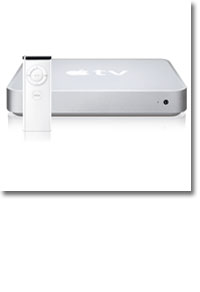


Review: Apple TV
- Article 8 of 16
- Macworld, May 2007
Apple’s easy to use media-streaming device, the Apple TV, arrives in the UK
Page 1 | Page 2 | All 2 Pages
Setting up streaming is almost as simple as syncing, although we found that getting the Apple TV to show up in the target iTunes computer was far harder than setting up syncing. Disabling the streaming computer’s firewall and using Ethernet temporarily usually worked; once paired, we could then revert our set-ups back to normal without problem.
One strange piece of clumsiness in the interface comes from the Apple TV failing to integrate the content from streaming computers with the synced content: you have to explore the separate Sources menu, which contains a mirror set of the main options for each machine, something we found a little odd. Depending on how fast your network is, initial syncing takes around an hour. We suggest connected to Ethernet for the initial sync and taking it from there to update content wirelessly. Day-to-day syncing can take some time as well: if you have anything less than a pure 802.11g network, you might want to consider investing in a new WiFi 802.11n network (such as the AirPort Extreme), or purchasing a plug device such as the dLAN 200 AV kit (www.develo.co.uk). We wouldn’t recommend streaming video unless you’ve the top-end networking options at your disposal.
Of course, it would be good to have some video content to put on the Apple TV. Forget the iTunes Store unless music videos and Pixar shorts are your thing. There’s also no TV tuner built into the Apple TV and no other kinds of input, so if you’re going to get video content onto it, you’ll need to crowbar it into iTunes.
While iTunes is good for importing CDs, it isn’t a great piece of movie-management software: you need to get something into QuickTime or MPEG4 format for it to even register with iTunes. You also need to add metadata manually, since there’s no IMDB integration, for example: if you don’t, you’ll find your videos aren’t sorted on the Apple TV in any decent way.
Getting video onto the Apple TV is harder still, since it only plays H.264 and MPEG4-encoded videos (which is why there’s no option to play movies stored in iPhoto). iTunes is a slow converter, as is QuickTime Pro which took nearly two hours using the Convert for Apple TV option to convert a 45-minute MPEG2 video we’d recorded and exported from our Elgato DTT stick. Elgato’s EyeTV software does have an excellent Export for iPod option that includes all the right metadata in the export, but it’s almost as slow as QuickTime.
iSquint to watch TV
Other third-party options work better. The free iSquint (www.isquint.org) works like a breeze, by comparison, and with the Optimize for TV setting cranked up to Go Nuts, we could convert 45 minute DivXs to excellent quality Apple-TV compatible videos in just 15-20 minutes. iSquint unfortunately possesses no metadata options so you’ll need to add information to any files you add to iTunes. We notice that Apple recently integrated the open-source DivX codec (XviD) in QuickTime; if it could just find a way to include this into the Apple TV the whole story of the Apple TV would be far different. It would go from an ‘avoid’ to a ‘must buy’.
To avoid conversions altogether, the best bet is Miglia’s TVMax+ hardware encoder, which saves video directly into MPEG4 format at an excellent resolution, thanks to its Apple TV setting. However, it has an analogue TV tuner built in, so if you’re planning to record Sky, Virgin Media or Freeview, you’ll need to have your set-box close by – or a long SCART-composite or USB 2.0 lead, depending on where you decide to locate the TVMax+. You’ll also have to brave the home-built software Miglia has started using in preference to EyeTV. All the same, it’s definitely a good investment for Apple TV owners.
The Apple TV is a lovely gadget, but it has more than a touch of the ‘stone soup’ about it: it requires so many extras and additions and so much extra work before it’s edible that you’ll be wondering if perhaps a Mac mini, a laptop or a simple iPod video out cable wouldn’t have been a lot simpler and a lot cheaper.
Buying Advice
Two stars may seem a harsh score for a well-designed product. But the lack of movie or television content in the UK, plus the inability of the device to play other formats than iPod video (notably DivX) work against the Apple TV. The range of hacks doing the rounds show that the device is capable of far more than it currently does (see the Apple TV Hacks website (www.appletvhacks.net)). Maybe Apple will implement some of these features in the future.
Movies and television aside: the Apple TV is a fantastic device for streaming music, and the ability to show off your photographs (plus of course home movies) on a television set, rather than on a computer, is a welcome addition to any household. We’re just not convinced that this alone is worth the £199 asking price. If Apple can start selling movies in the UK; improve iTunes’ ability to manage movies, and – above all – let the Apple TV play standard movie formats (DivX) then we’ll heartily recommend it. Until then, there are better things to spend your money on.
Page 1 | Page 2 | All 2 Pages