


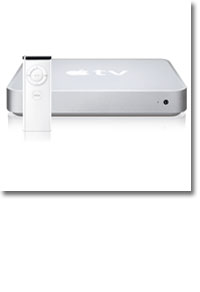
Review: Apple TV
- Article 7 of 16
- Macworld, March 2007
The Apple TV has finally landed in UK buyers' houses. Rob Buckley was the first to get one, here's his review
Intended as the home entertainment hub that will wirelessly bring together your computer's digital content and your TV set, Apple TV suffers from a couple of rather big problems: it's very hard to get content onto it and it's very hard to connect it to most TV sets.
The marketing is persuasive. You can have up to five Macs or PCs syncing with an authorised Apple TV on your wireless network (or wired network, thanks to a 10/100 base-T Ethernet port). Then, like a faster, better-looking Front Row, it can play all the content stored on its hard drive or streamed over your network while you, your friends and loved ones sit on a sofa, watching the television, instead of staring at a computer monitor.
Unfortunately, it all falls apart in practice. Firstly, the Apple TV has a very modern set of TV connection options: HDMI and component video are standard but, while these do offer superior video quality, unless you've already invested in an LCD or plasma screen TV your television is far more likely to have a SCART or phono connection.
You can connect the Apple TV to SCART provided your television has a SCART socket that accepts component video rather than RGB input, however this is a microscopically small number. It's also difficult to tell whether your SCART television has this functionality, most simply say 'SCART' in the instructions. Also, the component to SCART converters all lack audio inputs so you'd have to connect your audio up to the hi-fi system rather than to your television.
A device with the snappy title of JST Component (YUV) to RGB/VGA Converter will enable you to connect the Apple TV to a regular television set, it does however cost ?Ǭ�150 making it financially unviable - you're better off putting the money towards a newer television with HDMI inputs. However, direct out of the box there is no way to connect an Apple TV to the majority of older UK TV sets.
Then there's the tiny issue of content. Music isn't a problem and the Apple TV has excellent sound quality. But video is a different issue. To get video content onto an Apple TV, you need to convert it into an iPod-compatible format first, which takes time and expertise. The UK iTunes Store only offers some music videos and Pixar shorts, unlike the chockablock US store. There's no TV tuner card in the Apple TV so you can't record broadcast television without using a third-party device such as Elgato's EyeTV or Miglia's TVMax+ (we'd recommend the latter because it records directly to the iPod format so you don't have to wait for conversion to play it on your Apple TV).
Even if you do content onto it, you'll have to get used to the Apple TV's little ways, such as which fields in iTunes it uses to label videos with. We found that exports from Elgato's EyeTV TV tuner software tended to populate the iTunes “artist” field with things like “Drama series”, which isn't a problem on individual video previews, but does mean you don't have much of a clue what's what on the main selection screen until you re-label your videos and re-sync.
If you're looking for a seamless media experience, it would probably be best to stick to music and slideshows with the Apple TV. That does make it one of the most expensive photo albums and stereo systems available though, particularly if you end up buying an Apple Airport Extreme Base Station to ensure that glaciers don't overtake you while you wait for it to sync over 802.11b or g. Fortunately having synced the device once, you then only have to wait shorter times for it to update changes.
Deficiencies aside for one moment, picture and sound quality are generally very good ?��Ǩ��� or at least as good as they can be with downloaded digital files that are usually aimed at iPods rather than TV screens. Quality is understandably much better if you've exported video files to the more recent 640 x 480 format, which matches DVD.
With a 40GB hard drive that's easily outclassed by a top-end iPod, the Apple TV is ludicrously underspeced. Our iPods generally contain that amount of audio, and video takes up far more space than you'd initially think - although you can set the device to only sync unwatched shows, the 40GB limitation seems needlessly stingy to us.
The lack of video content on the iTunes UK store, and inability to playback DivX files ensures that the Apple TV remains near to useless for a general UK audience. We can't help but feel that the Apple TV is a product that needed more features (DivX notably) before hitting the US market, and even more time adapting its output options for the UK market.
Buying Advice
Apple TV suffers from a couple of rather big problems: it’s very hard to get content onto it and it’s very hard to connect it to most TV sets. Its inability to play DivX formats, plus reliance on the as yet non-existent UK iTunes store video content really do work against it. As such we can't recommend this product at this point in time.
Anyone with enough technical expertise and the cash necessary for an expensive TV upgrade will find that the Apple TV is indeed pleasant to use in practice and does all it claims to. But everyone else can find cheaper, better options, such as an video-out iPod cable.